






What to Look for in Sales Automation Software (And What to Avoid)
Let’s get right to it. You’re on the hunt for a sales automation software.
Clever you – the right sales automation tool can help your team move faster, focus better, and sell more.
You look to your left – and see a shiny new tool that looks promising…but wait! Look a bit closer, and you’ll see it’s actually pretty complicated. No thanks.
You look to your right – and catch the eye of another sales pro who, we’re sorry to say, has a lot of red flags coming out of their mouth. Next!
Finally you come across the tool for you: its features are actually useful, it aligns with your current workflows, and it doesn’t come with a load of empty promises. Nice work.
Your secret to finding the right sales automation tool so quickly? This blog post. It breaks down what to look for, what to avoid, and how to make sure you choose one that actually helps your reps, rather than just looking good in a demo. Here’s what’s coming up:
- Look for Workflow Alignment, Not Just Features
- Prioritize Data Accuracy and Flexibility
- Avoid Over-Automation That Replaces Strategy
- Check Integration Quality, Not Just Compatibility
- Make Sure It Scales Without Adding Admin
Think of the five minutes you spend reading this as your shortcut to sales automation tool-choosing success. Let’s get started.
Look for Workflow Alignment, Not Just Features
Good automation removes steps. Bad automation gives your reps a new hobby: admin.
If a tool adds more clicks, more tabs, or more time, it’s not helping. It’s just dressing up complexity as innovation.
Instead of prioritizing feature lists, ask: does this tool work where your team already works? Look for tools that:
- Live where your reps prospect (LinkedIn, email, CRM)
- Cut down on tab-hopping and copy-pasting
- Offer one-click actions like syncing leads or logging activity
- Have an interface that won’t make your team beg to stop using it. When existing tools don’t meet these criteria, many businesses partner with a software development services company to build custom automation solutions that integrate seamlessly with their team’s existing workflow and eliminate unnecessary complexity. Others might rely on nearshore development services if they prefer working with a development team that can collaborate in real time.
Want an example? Enter Surfe: a Chrome extension that sits right inside LinkedIn and automates what your reps do from there. It enriches leads, finds verified email address and phone numbers and syncs them to your CRM in a click. All without asking your reps to change the way they already prospect.
Prioritize Data Accuracy and Flexibility
Nothing derails prospecting like bad data. Bounced emails, outdated job titles, companies that haven’t existed since 2021 – your reps deserve better.
Lots of tools promise lead enrichment, but most pull from a single data source. That means if the info’s wrong there, it’s wrong everywhere. And now your rep is emailing someone who left the company six months ago. Great.
Reliable automation has to be, well, reliable, and give your team options, not restrictions.
Look for tools that:
- Use multiple enrichment sources (so you’re not stuck with stale data)
- Enrich both individual profiles and entire lists
- Let you choose when and how to enrich
- Don’t trap you in a pay-per-contact model or a walled-off database – it’s not really automation if there are limitations
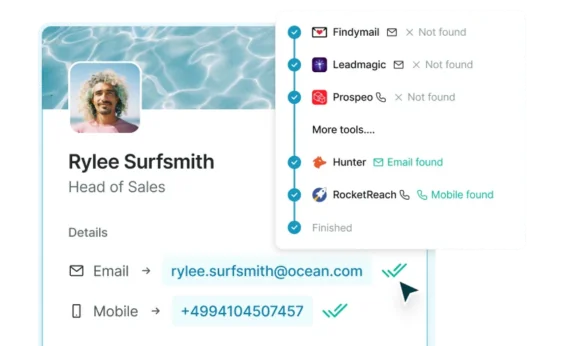
Soz to toot our own horn again, but Surfe takes this stuff seriously. Instead of relying on one provider it uses a waterfall enrichment cascade, which basically means it pulls from multiple sources to increase accuracy. Whether you’re enriching a single LinkedIn profile or uploading a whole list, you’re getting data you can trust. And since it’s built into your reps’ existing workflow, they stay in control.
Avoid Over-Automation That Replaces Strategy
There’s a fine line between helping reps move faster and removing them from the process entirely.
The promise of full automation can sound appealing: automatic sequences, auto-filled CRMs, leads zipping through the sales funnel without anyone lifting a finger. But if your reps can’t step in, review, or adjust, they may as well be working with blinkers on. Sorry to anyone who was dreaming of a life on the beach and a 4-hour workweek.
Sales automation should support judgment, not replace it.
Watch out for tools that:
- Auto-create sequences from scraped data
- Push unqualified leads straight into your CRM
- Remove review steps or limit rep visibility
These sound efficient on paper, but in practice? You end up with bloated CRMs, confused prospects, and reps untangling messes instead of closing deals.
Instead, you want a tool that enables fast decisions, yes, but still puts you in the driving seat.
Check Integration Quality, Not Just Compatibility
“Integrates with [insert major CRM here]” might look good on the website. But what does that actually mean?
Too often, it means: syncs basic fields, creates duplicates, ignores custom workflows, and leaves RevOps doing cleanup every Friday.
It’s not enough for a tool to say it integrates – you need to know how it integrates before you sign on the dotted line.
Ask:
- Does it push and pull data cleanly in both directions?
- Can it match your CRM’s custom fields, deal stages, or routing rules?
- Does it maintain formatting and ownership without breaking workflows?
A good crm integration should reduce admin, not create more of it.
Tools like Surfe get this right (oh look, it’s us again!). Instead of a generic CRM “connection,” it offers deep syncing with HubSpot, Salesforce, and more – respecting your setup, your fields, and your workflows.

Make Sure It Scales Without Adding Admin
Will the automation still work when your team grows from 5 reps to 25?
Some tools look great in the pilot stage – slick UI, fast setup, impressive demo. But six months later, you’re knee-deep in Slack threads, duplicate records, and a RevOps team quietly weeping into their dashboards.
Scalability isn’t about adding more seats. It’s about keeping complexity low as your team gets bigger and faster.
Look for tools that:
- Support bulk actions (like list enrichment and mass syncing)
- Offer API access so your workflows can evolve with your team
- Include roles and permissions that grow with your org, not against it
And avoid tools that need a weekly babysitting session. If RevOps has to jump in just to keep things working, the tool’s not saving time – it’s borrowing it.
Red Flags to Watch Out For
- “We have our own database of 700M contacts” = these contacts are rarely reliable
- “No CRM? No problem!” = this will be a problem
- “AI-powered sequences” = ok…but what does that actually mean?
- “One-click everything”= you’re giving up something for speed
Let’s Wrap It Up!
Woah, you’ve just set a new world record!
World’s fastest choosing of a sales automation tool: it’s got a nice ring to it! Congrats!
Remember, sales automation is only valuable if it fits into your reps’ day-to-day, improves your data, and scales without adding admin. If it doesn’t do any of these, you need to keep looking. Next!
Sales automation tool hunt: completed.
You’ve chosen Surfe! Great move – just hit the button below to get going.
FAQs About Choosing Sales Automation Software
What Is Sales Automation Software?
Sales automation software helps sales teams cut down on manual tasks like data entry, lead enrichment, CRM updates, and outreach coordination. The goal is to make reps faster and more focused – without adding friction. Good tools work where your reps already work (like LinkedIn or your CRM), and support smart decision-making rather than replacing it. If it adds steps, complexity, or mystery fields in Salesforce, it’s not really automation – it’s just admin in disguise.
What Should I Look For In Sales Automation Software?
Look for a tool that removes steps – not adds them. It should integrate cleanly with your existing workflow, offer accurate lead enrichment from multiple sources, and scale as your team grows. One-click CRM syncs, custom field mapping, bulk actions, and API access are all green flags. Just avoid tools that need a lot of admin or promise the world without showing you how it actually works.
What Are Red Flags In Sales Automation Tools?
Some classic red flags include: “700 M+ contact database” (translation: stale data), “AI-powered sequences” (how exactly?), and “No CRM? no problem!” (actually, big problem). If a tool promises to do everything in one click, it’s worth asking what corners it’s cutting. Also beware tools that rely on a single data source or require constant RevOps intervention just to stay functional.
How Do I Know If A Sales Automation Tool Will Scale?
Check how the tool handles bulk actions, user permissions, and workflow flexibility. Can it enrich an entire list in seconds? Can it handle API calls from your internal systems? Can you assign different roles without things breaking? If you’re relying on manual fixes or RevOps workarounds now, it’ll only get worse as your team grows.
Does Sales Automation Replace Salespeople?
Not if it’s done right. Good sales automation supports reps by handling repetitive tasks and surfacing better data – so they can focus on building relationships and closing deals. Bad automation tries to take over entirely, leading to irrelevant outreach, bloated CRMs, and missed context. The best tools keep reps in control, not out of the loop.