






How to Find Decision-Makers on LinkedIn and Enrich Their Contact Info Instantly
If you’re selling into B2B, there’s one truth that shapes every quarter: your outreach depends on the person who receives it. And yet, finding the right decision-makers with accurate B2B contact enrichment remains one of the most persistent challenges in outbound sales.
Signals of authority are often unclear, misleading, or downright non-existent: job titles don’t always reflect actual position, LinkedIn profiles have gaps, reporting structures vary widely between companies. And that’s before we’ve even got onto finding the right contact details – if they’re incomplete or outdated, sales reps have to step in to research and manually copy-paste what they find into the CRM. When blockers like this repeatedly occur, businesses start missing out on opportunities. Lots of them.
This article presents a different approach. One that helps sales teams identify the right stakeholders quickly, enrich accurate contact information from LinkedIn, and push that data directly into the CRM without disrupting their workflow. Each step is designed to reduce friction and help teams act on qualified opportunities without delay.
Let’s get started.
Identify the Right Decision-Makers for Your ICP
Before you run a single search, get clear on who you’re actually trying to reach. Too many prospecting efforts are held back because there’s no real definition of “decision-maker”. When that definition shifts from rep to rep – or deal to deal – the sales motion becomes inconsistent, and qualified opportunities are lost.
Break it down by criteria:
- Seniority: are you targeting Directors who lead day-to-day operations, VPs with budget control, or C-level sponsors who can unblock deals?
- Function: which department owns the problem your product solves? For a RevOps tool, that might include Sales Enablement, Marketing Ops, or GTM leadership – not just RevOps by title.
- Company context: the right contact at a 50-person SaaS company might look very different from the equivalent at a 5,000-person enterprise. Geography can shift titles and responsibilities, too.
- Buying role: does this person hold budget authority, influence evaluation, or control implementation? Each one plays a different role in the buying process.
Make sure everyone on your team is working from the same definition by creating standard CRM personas or lead tags that reflect your ideal buyer profiles, and building them into your sequences, scoring, and reporting. When teams are aligned on who to target and why, prospecting becomes more focused – and your pipeline more predictable.
Surface Decision-Makers Using LinkedIn or Sales Navigator
Once you’ve defined who you’re targeting, LinkedIn becomes your most efficient source of prospecting intelligence. It’s the fastest way to locate real people in real roles – but only if you know how to use it with precision. Here’s how:
Use Advanced Search Filters
Start with LinkedIn’s filtering tools. Use job title, company size, department, and region to isolate profiles that match your ICP. The more specific your inputs, the stronger your outputs. Avoid generic titles – instead, focus on functions and keywords that reflect real buying responsibility.
Scan Profiles for Structure and Signals
A job title rarely tells the whole story. Look at role descriptions, reporting lines, and team scope to assess influence. Someone with a niche title might own the exact problem your solution solves. Career history and internal mobility can also reveal where they sit in the decision-making process.
Leverage Shared Context
Shared connections, recent activity, or mutual interests can help you assess accessibility. If a lead is actively engaging with content or has multiple touchpoints in common with your network, they’re more likely to respond – and more open to outreach.
Refine Targeting in Sales Navigator
If you have LinkedIn Sales Navigator, you can zero in on more profiles that fit your requirements. Use filters for seniority, function, and job changes to zero in on prospects with current decision-making power. Prioritize those who’ve recently taken on new roles or responsibilities – they tend to be more active evaluators.
Surfe is a lead enrichment Chrome Extension that lets you enrich contact data and sync it directly to your CRM – all from LinkedIn. It works seamlessly across both LinkedIn and Sales Navigator, so the moment you find the right profile or profiles, you can access verified contact details and push them straight into your workflow, without switching tools or slowing down.
Turn LinkedIn Profiles Into Reachable Leads With Verified Data
Finding the right profile is only half the equation. If you can’t reach the contact – quickly, directly, and with confidence – the opportunity stalls. That’s where data enrichment becomes essential.
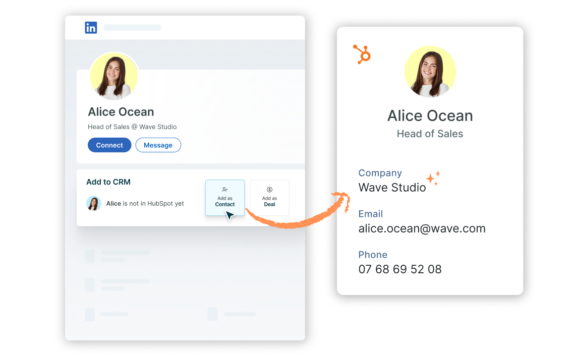
With Surfe, you can enrich a contact in one click. Just hit the “Add as contact” button next to any LinkedIn or Sales Navigator profile. Surfe’s Waterfall Enrichment cascade instantly searches top-tier data providers to return verified contact details – including work and personal emails, direct dials, job titles, LinkedIn URLs, and company information.
Match rates reach up to 93%, with fallback logic built in for harder-to-source regions. You can enrich one profile at a time while prospecting or run enrichment in bulk, depending on your workflow.
Everything happens in place – users never need to leave the LinkedIn tab. And because Surfe handles enrichment natively, you won’t need to invest in a separate enrichment platform. From profile to verified contact, everything happens right where you work.
Activate Decision-Makers Instantly From Your CRM
Once you’ve enriched the right contact, the fastest way to act is to move them into your CRM – with full context and zero delay.
Surfe automatically creates or updates CRM records in tools like HubSpot, Salesforce, and Pipedrive. That includes assigning owners, tagging personas, setting lead status or pipeline stage, and syncing notes captured during prospecting – all without leaving LinkedIn.
Before a new record is added, Surfe automatically scans your CRM to detect duplicates. If the contact already exists, you’ll be notified – so you can update the record instead of creating a new one. Attribution is also built in, making it easy to track where your best leads are coming from.
When contact data flows straight into your CRM – with ownership, context, and attribution in place – your team can act immediately, without lag time, missed handoffs, or leads getting buried in spreadsheets. Every decision-maker you find is ready for outreach, without admin slowing things down.
Finding Decision-Makers on LinkedIn: Final Thoughts
Finding the right decision-makers is still one of the most effective – and overlooked – ways to improve outbound performance. When your team can identify the right contact, reach them instantly, and move them straight into the CRM, everything speeds up: prospecting, handoffs, and pipeline momentum.
Surfe makes that entire workflow seamless. From a single LinkedIn or Sales Navigator profile, you can identify the right stakeholders, enrich verified contact details with one click, and sync that data directly into your CRM – ready for outreach, without friction.
This isn’t about chasing more leads. It’s about getting better leads, faster – with less manual work, fewer tools, and more control over your pipeline.
FAQs
What Is a Decision-Maker in B2B Sales?
A decision-maker in B2B sales is someone with the authority to influence, approve, or sign off on a purchasing decision. This role varies based on the size, structure, and buying process of the organization. In smaller companies, the CEO might handle most decisions. In larger businesses, decision-making is often distributed across functions – with VPs, Directors, and functional leads involved at different stages. It’s not always about the title – a “Head of Enablement” might have more practical influence than a VP in some contexts – which means identifying decision-makers requires a clear understanding of the company’s org structure, buying process, and the problem your solution is solving.
How Do You Identify Decision-Makers on LinkedIn?
To identify decision-makers on LinkedIn, start with a clear ICP and use advanced filters to zero in on seniority, department, and company size. Look beyond job titles – assess role descriptions, reporting lines, and career history to understand influence. Someone with a niche title might still control budget or own the problem your product solves. Sales Navigator offers even deeper targeting, letting you filter by seniority level, function, and recent job changes. Shared connections or recent activity can also indicate accessibility. The key is precision: define your criteria, search with intent, and validate influence based on context rather than titles.
Why Is It Hard to Find Decision-Makers in B2B Sales?
Finding decision-makers is challenging because authority isn’t always visible. Job titles are inconsistent across industries, LinkedIn profiles can be incomplete, and reporting structures aren’t always public. Even when you land on the right person, contact details are often missing or outdated. This forces reps to spend time researching, guessing, or switching tools just to confirm who’s worth reaching out to. Without a reliable system to enrich and verify contact data, high-potential leads slip through the net. That’s why a clear prospecting framework – and the right tools to support it – are essential for surfacing real decision-makers.
What Tools Help You Reach Decision-Makers Faster?
The most effective tools for reaching decision-makers streamline identification, enrichment, and activation – without breaking your workflow. LinkedIn and Sales Navigator remain essential for surfacing the right profiles. Surfe then builds on that by enriching verified contact data directly from LinkedIn, including work emails and direct dials. With Surfe’s Chrome Extension, reps can add a contact to their CRM in one click, complete with ownership, attribution, and full context. It removes the need to juggle multiple platforms or buy separate enrichment tools – giving you faster access to verified contacts who are ready for outreach.
How Can You Verify Contact Details for Decision-Makers?
To verify contact details for decision-makers, use a data enrichment tool that integrates directly with where you prospect. With Surfe, you simply click “Add as contact” on any profile. Surfe’s Waterfall Enrichment cascade then pulls from top-tier providers to return verified emails, phone numbers, and role data. Match rates reach up to 93%, with fallback logic in place for harder-to-source regions. Everything happens in-browser, so you don’t have to switch tabs or rely on manual entry. This ensures your CRM is always populated with clean, actionable data – ready for outreach.
Why Does Reaching Decision-Makers Improve Sales Performance?
Targeting the right decision-makers shortens sales cycles and improves conversion rates. When outreach is directed at contacts with real influence – rather than gatekeepers or mid-level roles – your team avoids wasted effort and accelerates deal momentum. Decision-makers can unblock evaluations, approve budgets, or bring in the right stakeholders faster. That alignment reduces back-and-forth, lowers drop-off risk, and ensures your messaging speaks to someone who can actually move the deal forward. The result is more efficient prospecting, cleaner pipeline, and a stronger return on every touchpoint your team initiates.