






How to Enrich LinkedIn Leads in Bulk Without Wasting Credits
LinkedIn is one of the strongest sources of intent-rich LinkedIn leads, but most sales and RevOps teams still face friction turning them into reliable outreach.
Traditional free email finder tools either burn through credits quickly or return low-quality, unverified results. Manual workarounds like copying data by hand or uploading CSVs only add to the slowdown – and scraping tools can create compliance risks no team can afford.
Surfe offers a better solution. Surfe’s free email finder lets you enrich LinkedIn leads instantly using a multi-source engine that verifies emails and syncs them directly to your CRM – without wasted effort or operational risk.
This guide shows you how to enrich LinkedIn leads in bulk using Surfe, so your team can focus on outreach that converts instead of chasing missing data.
Let’s get into it.
Prepare Your LinkedIn Lead List
Strong data enrichment starts with strong inputs – and that means building lead lists that are clean, targeted, and aligned to your ICP from the outset.
Use LinkedIn or Sales Navigator to generate lists with clear, consistent filtering. Prioritize:
Firmographic criteria:
- Company size
- Industry
- Location
Functional criteria:
- Job title
- Department
- Seniority
Once your list is built, you have two options for exporting. You can save leads to a Sales Navigator list and capture them directly using Surfe’s Chrome extension, or export your search results into a CSV. Both paths are supported – the right one depends on your team’s process and volume.
Precision here pays off. The more structured your lead list, the more accurate and complete your enrichment results will be – and the more likely those leads are to sync cleanly into your CRM, ready for use across outbound, scoring, or routing workflows.
Use Waterfall Enrichment to Improve Match Rates
Most enrichment platforms rely on a single data provider. And this means that match rates will vary by region, role, and company size. No single source can cover everything consistently. And when you’re enriching at scale, every missed match means a lost opportunity or wasted credit.
Surfe takes a different approach.
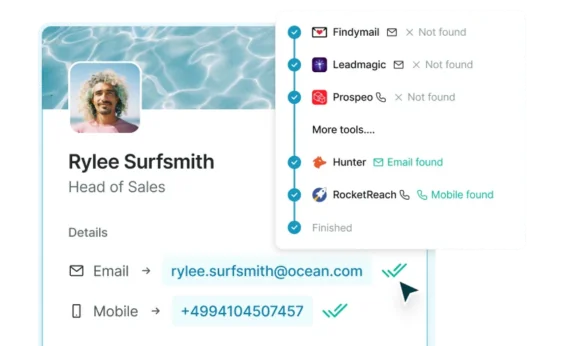
Instead of depending on one database, Surfe uses waterfall enrichment technology to search for contact data through a dynamic, multi-source cascade. To support this at scale, many teams also integrate the best mobile proxies, which provide rotating mobile IPs that improve data accuracy, reduce blocks, and help maintain reliable access across regions. Each lead is passed through multiple top-tier data providers – automatically – until a verified match is found. That means fewer false negatives, more complete results, and no need to rerun or duplicate lists manually.
Surfe also filters out unreliable results along the way. Catch-all domains, personal emails, and invalid entries are removed before they reach your CRM. Only verified, work-based contact details make it through – with built-in region-specific logic to improve accuracy across global territories.
The result: higher match rates, stronger lead coverage, and fewer wasted credits across every list.
Enrich in Bulk Without Burning Through Credits
Manual enrichment doesn’t scale. And even semi-automated workflows can fall short when teams need to process high lead volumes with precision – especially when every credit has a cost.
Surfe’s bulk enrichment workflow is built to handle volume efficiently. Instead of enriching contacts one by one, you can upload a CSV file and process hundreds or thousands in a single pass. Surfe automatically screens the list, removing low-quality inputs like invalid domains, missing names, or duplicate records, before enrichment begins.
Only leads with a meaningful chance of entering your pipeline are sent through Surfe’s multi-source cascade. That means credits are used only where there’s a verified opportunity to return accurate, actionable data.
And because the output is always accurate, the data can be pushed straight into your CRM – no manual review or extra cleanup steps required.
For SDRs running large outbound lists or RevOps leaders managing lead volume and spend, the efficiency gains are immediate.
Sync Enriched Leads to Your CRM Automatically
Even the best enrichment workflow can fall short if teams are still forced to enter contact details manually. Copying information into the CRM slows progress and increases the likelihood of errors, duplicate records, and misaligned fields.
Manual work slows teams down, which is why a Surfe workflow doesn’t include any.
Enriched leads can be synced directly into your CRM – including HubSpot, Salesforce, Pipedrive, or Copper – with predefined field mappings already in place. Contact and company records are matched automatically, so there’s no need to check for duplicates or worry about inconsistent formatting.
Each record is complete before it’s added. Verified email addresses, job titles, phone numbers, and company details are structured for accuracy and ready to use immediately.
This ensures your CRM stays clean, current, and ready for engagement – supporting fast follow-up, accurate lead scoring, and smooth handoffs across the revenue team.
Scale With Automation Using the Surfe API
For teams looking to industrialise their LinkedIn lead workflows, enrichment alone isn’t enough. Manual triggers, list uploads, and batch processes can only take you so far. At some point, scale demands automation.
Surfe’s Enrich People API allows you to embed enrichment directly into your lead management systems. You can trigger enrichment automatically based on CRM events – when a new contact enters your pipeline, joins a list, is assigned to a rep, or reaches a scoring threshold.
This turns enrichment into a background operation – always on, always working, without any extra steps required.
It’s also flexible by design. Whether you’re running ABM campaigns, territory routing, or intent-based segmentation, Surfe’s API allows you to enrich leads at the moment they matter most.
The result is a fully integrated enrichment system that supports scale without compromising precision. Leads enter your CRM clean, complete, and ready for whatever workflow comes next – whether that’s scoring, routing, or outreach.
Let’s Wrap It Up!
Enriching LinkedIn leads shouldn’t involve scraping profiles, juggling tools, or burning credits on incomplete data. With Surfe, you can move from lead list to CRM-ready contact in a single, streamlined flow – with verified data and zero manual steps.
It starts with building precise lists using your ideal customer filters. From there, Surfe enriches those leads in bulk using a multi-source cascade, filters out low-quality results automatically, and syncs complete contact records directly into your CRM.
The outcome is clear: higher match rates, fewer wasted credits, and a CRM that’s ready for scoring, routing, and outreach the moment a lead enters the system.
FAQs
What Is the Best Way to Enrich LinkedIn Leads?
The most effective way to enrich LinkedIn leads is by using a multi-source enrichment platform like Surfe. Unlike single-source tools, Surfe’s waterfall enrichment searches through multiple top-tier data providers to verify contact details. This method increases match rates and reduces wasted credits by only enriching leads that have a high likelihood of returning accurate results. It also removes invalid emails, catch-all domains, and personal addresses before syncing the data directly into your CRM. Whether you’re enriching a few dozen leads or thousands at once, this approach ensures your LinkedIn leads are clean, compliant, and ready for outreach – without the overhead of manual exports, patchwork enrichment tools, or scraping.
Can You Export Contact Details From LinkedIn Leads?
LinkedIn and Sales Navigator don’t allow direct export of verified emails or phone numbers – which is why enrichment is essential. While you can build and filter lead lists within LinkedIn, the platform restricts access to actual contact data. To bridge this gap, many teams turn to enrichment tools. Surfe enables you to capture leads from LinkedIn or Sales Navigator and enrich them automatically using a multi-source cascade. You can either capture leads one by one using the Chrome extension or upload a full list via CSV for bulk processing. Once enriched, contact data is synced directly into your CRM, fully verified and formatted.
How Do You Build a High-Quality LinkedIn Lead List?
A strong LinkedIn lead list starts with a clear ICP and structured filters. Use LinkedIn or Sales Navigator to define leads by both firmographic and functional criteria. Firmographic filters should include company size, industry, and location. Functional filters should cover job title, department, and seniority. Once your filters are set, either save leads to a Sales Navigator list for capture via Surfe, or export your results into a CSV for bulk enrichment. The tighter and more relevant your list, the better your enrichment results will be – which means higher match rates, cleaner CRM records, and more efficient outreach.
How Can I Enrich LinkedIn Leads at Scale?
To enrich LinkedIn leads at scale, you need a system that can process large volumes efficiently without compromising on data quality. Surfe’s bulk enrichment workflow allows you to upload full lead lists and enrich them in a single pass. The platform screens out incomplete or duplicate entries automatically, ensuring only leads with a high chance of successful enrichment are processed. Each verified record is then synced into your CRM – structured, complete, and ready for use. This workflow helps RevOps and sales teams move faster while staying accurate, avoiding the inefficiencies that come with manual processes or credit-heavy enrichment tools.
Why Do Most LinkedIn Lead Enrichment Tools Waste Credits?
Most LinkedIn lead enrichment tools rely on a single data provider, which limits their coverage and accuracy. When a match isn’t found, or when the data returned is incomplete or invalid, credits are still consumed – even if the result can’t be used. Surfe avoids this by using waterfall enrichment: a dynamic process that searches across multiple verified data sources until a quality match is found. Leads that don’t meet validation criteria – such as those with invalid domains or missing information – are excluded before enrichment begins. This makes sure credits are only used on leads that deliver real, usable data.
How Can I Automate LinkedIn Lead Enrichment?
Automating LinkedIn lead enrichment starts with integrating enrichment into your CRM workflows. Surfe’s Enrich People API allows you to trigger enrichment automatically based on key events: when a new lead enters your system, joins a list, gets assigned to a rep, or reaches a specific scoring threshold. Instead of relying on manual uploads or batch processes, enrichment becomes a background operation. This automation supports ABM, scoring, routing, and segmentation strategies by ensuring that every new LinkedIn lead is enriched and CRM-ready at the point of entry. It’s how scalable teams maintain speed and precision without manual overhead.