









Faster message typing, smarter outreach
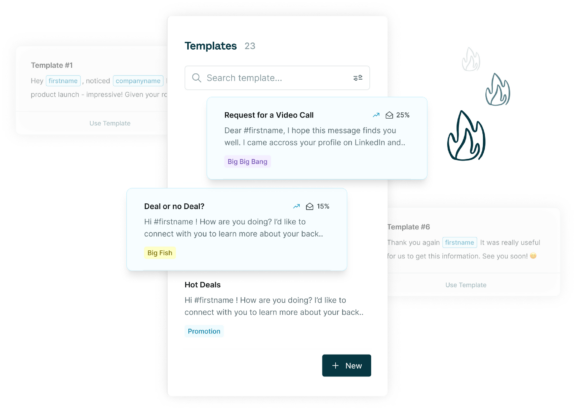
Use personalized message templates in business social messages for a productivity kick. Message analytics tell you which template has the highest response rate so your outreach is always improving.
Trusted by top sales teams around the world















Never send a message the same way again
You shouldn’t have to type the same things over and over or copy and paste your conversations to your CRM.
Surfe is a Chrome extension for your business social that allows you to insert a personalized template into social messages so you don’t need to type each one out yourself. Save time and send personalized messages on your business social at the click of a button.
Do you find yourself sending the same message over and over again to a lot of social contacts? Do you copy and paste your template into your social message and then manually change the recipients name and company each time? With Surfe, we do all of this for you. Write your template and insert it at the click of a button with the recipients name, company, and job role personalized automatically.
Surfe provides Message Templates through a fully ISO 27001 certified Chrome extension. The certification sets rigorous requirements for managing and protecting sensitive data. Surfe is also fully GDPR compliant as both a Data Processor and a Data Controller. With Surfe, your Message Templates for business socials are safe and secure.
Message Templates for recruiting allow hiring teams and recruiters to reach out to social contacts with a personalized and predetermined message template. Surfe’s Message Templates allows users to reach out to a higher number of people more efficiently whilst keeping messages clean and accurate. Recruiters can view response rates for their Message Templates to see which outreach messages evoke the highest response.
Surfe’s Chrome extension for Message Templates works the same way for the business social platform and it’s mail tool. When sending mail, simply click Surfe’s Template icon and select the template you’d like to send.
Surfe uses variables to personalize your Message Templates depending on the personal details of the contact you’re messaging. Templates automatically fill in the recipient’s first name, last name, company, and position for you so that your messages are personalized and accurate every time.
Surfe provides an analytics dashboard that shows you the average response rate of your message templates at a glance. Compare the reply rates of different templates to see which is evoking the highest response from your prospects.
By inserting variables like {first_name} into your message template, Surfe takes the information of your contact and personalizes the message. This way, you don’t need to type or copy and paste the contact’s details into your message each time. “Hello {first_name}, I see you are working as a {current_position} at {company_name}” becomes “Hello John, I see you are working as a Sales Rep at Surfe”.
Surfe provides an analytics dashboard where you can see information on which of your message templates receives the highest response rate. Compare templates and see what works best. For example, you can create a template in a friendly tone and one in a more professional tone and then compare which one gets the highest response rate.
Yes! Surfe will sync all of your messages into your CRM so that you can track relationships and keep your team updated.
Yes! You can share your templates with all of the members of your team. When you see that one of your templates is receiving a higher than average response rate, share it with your team to raise the response rates for everyone!
Yes! Surfe offers a 14 day trial for you to experience how our product increases your efficiency, productivity, and data accuracy before committing. Our Free Plan also includes a limited version of Message Templates where you have access to one message template at a time and see your response rate.