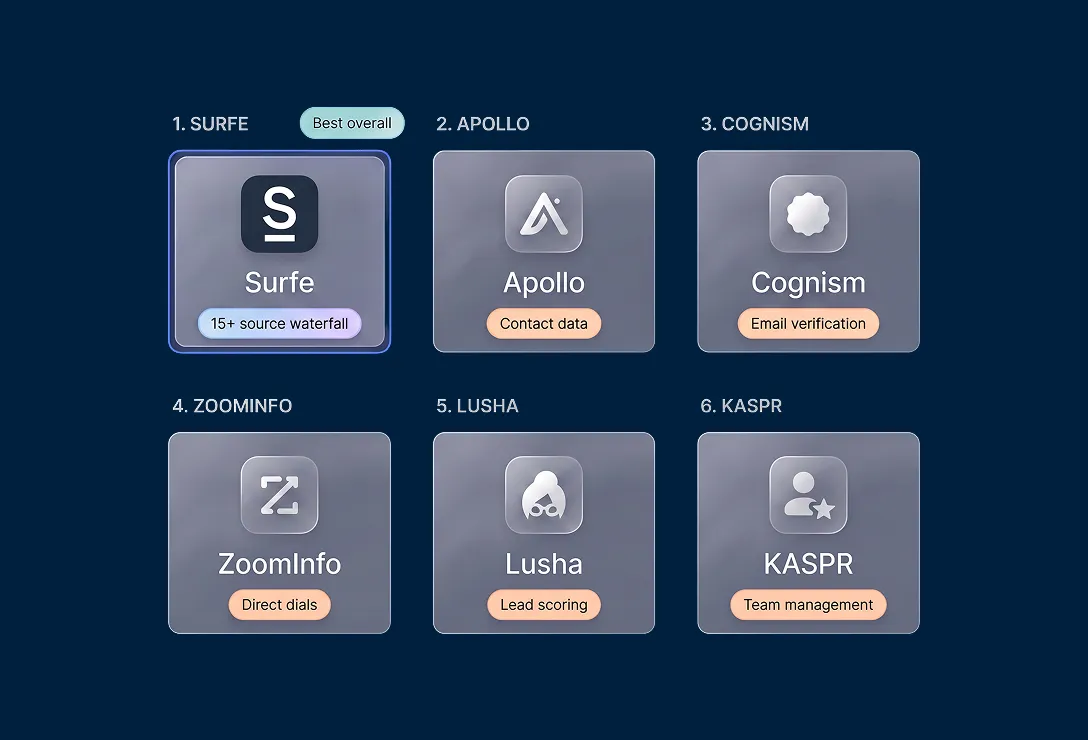
The best B2B prospecting tool covers the whole job, from finding the right person to knowing when and why to reach out, all the way to a booked meeting logged in your CRM. Most tools do one slice of that and leave you to connect the rest. This guide groups the market by the job each type does best, and names the one built to do the whole thing, so your reps spend more time selling and less on admin.
Good prospecting comes down to knowing who to contact, and when and why. The who might be a former champion who just landed a new role, or a lookalike of the account you closed last quarter. The why is the trigger that makes today the right day to call: a funding round, a hiring spike, a job change. And once you know all of that, it still has to land where your team actually works, in your CRM, in your sequencer, in the LinkedIn™ tab already open in front of you. It is a lot of moving parts, and done by hand it means a different tool for each one: tab to a database, tab to LinkedIn™, tab to a verifier, paste into the CRM, and start again on the next name.
The best prospecting tool collapses that whole lifecycle into one motion, inside the tools your team already runs, so reps get their selling time back and sales gets to be sales. Most tools on this list do one or two of those jobs very well and quietly leave you to stitch the rest together. This guide groups them by the job they own, shows where each one stops, and names the one built to run the full lifecycle in a single place.
A prospecting tool exists to move a rep from "we should sell to companies like this" to "here is a verified person, this is why now, and here is a first line that fits." That is a lifecycle, not a lookup, and it runs across six stages:
A tool that nails one of these and ignores the rest is not wrong, it's just partial. And the cost of partial is always paid by the rep: every stage a tool skips becomes a tab they keep open and a step they do by hand. Add up the stitching and you get the exact thing every sales leader is trying to kill, reps spending most of the day on admin instead of selling. Giving that time back is the entire point of the category.
The criteria that actually matter are simpler than the feature lists suggest. Three things tell you whether a B2B prospecting tool will carry the whole lifecycle or just one slice of it.
Data quality across your regions and seniorities. Not the vendor's headline accuracy number, measured on the vendor's own data, but the find rate on your list, in your markets, for the titles you actually sell to. Source strategy lives here too: every single database has blind spots by geography, seniority, and vertical, so a waterfall across many providers resolves more than any one of them and verifies the match before it lands. One Amazon team reached roughly a 90% find rate by cascading across sources, higher than any single database returned on its own. Which underlying database to trust is its own decision, and something we cover in Best B2B Data Providers. However you compare tools, do it the same way: run a sample of your own contacts and measure find and bounce rates before you pay.
Fit with the stack you already run. A prospecting tool should be connective tissue, not another login. The good ones work where your team already lives, inside Salesforce, HubSpot, or Pipedrive, alongside your sequencer and your LinkedIn™ workflow, and drop clean, deduplicated records straight into them. The moment a tool makes reps work in a parallel UI and reconcile exports later, it has added admin, not removed it. Judge a tool on how invisibly it fits the system that already powers your pipeline.
Timing and a first line, not just contacts. A database hands you who. A platform also tells you when, with buying signals, and helps with what to say, by drafting an opener anchored to the signal. Those last two stages are where a list becomes a conversation, and they are exactly what most contact tools leave out. You should be able to prove all three on a free plan, on your own data, before you commit.
Most tools in this market are excellent at one stage of the lifecycle and quiet about the other four. Grouping them by the job they own makes the trade-offs obvious, and shows exactly where you would still be stitching.
This is the incumbent category, and the one most people picture when they say prospecting tool. ZoomInfo is the enterprise standard, deep on US firmographics and intent, though the price and admin overhead are real and coverage thins the moment you sell outside its core. Apollo bundles a large database with a sequencer at an accessible price, which is why SMB teams reach for it, but all-in-one tends to mean wide and shallow, and the data is single-source and weaker on mobiles in several regions. Cognism is the European answer, with phone-verified mobiles and a GDPR-first posture that make it strong across EMEA mid-market. Lusha is the fast, polished option for quick lookups and individual reps, with a generous free tier that thins out at scale and in DACH. Further along the same shelf sit RocketReach, Seamless.AI, and UpLead, each a serviceable single database with its own coverage quirks.
What none of them escape is the structural limit of a single source: every database has blind spots by geography, seniority, and vertical, so the find rate you get is only as good as the records that one vendor happens to hold. CRM sync is usually partial, timing and messaging are left to you, and you become the integrator who stitches each record into an actual workflow. The way past that ceiling is to stop trusting any single database and cascade across many at once, which is the whole idea behind a waterfall, and the thread the rest of this comparison pulls on. Compare them directly: Surfe vs ZoomInfo, Surfe vs Apollo, Surfe vs Cognism, and Surfe vs Lusha.
These tools answer a different question: not who to contact, but which accounts are in-market right now. 6sense is the heavyweight, pairing predictive intent with ABM and AI agents across a very large signal graph, and it earns its place for enterprise demand teams. Bombora is the intent data co-op that sits underneath much of the category, feeding signals into other platforms rather than acting as one itself. Common Room brings buyer intelligence and community signals together for PLG-first companies watching product usage.
The gap is consistent across all three: they tell you when, but they do not hand you the verified contact to act on, and they do not run the outreach. Intent without a data layer and a workflow beneath it is a dashboard, not pipeline. You still need something to turn "this account is heating up" into "here is the verified person, with a first line, already in the sequencer," which is precisely the stretch these platforms leave open.
This is the execution layer, the tools that actually send. Salesloft and Outreach are the sales-engagement incumbents, both now expanding into prioritization and AI, though their scoring runs on the CRM data you already have, with no multi-source waterfall or cross-CRM behavioral learning underneath it. Regie is a sequencer with AI agents bolted on for copy at scale. The newer AI SDRs, the 11x and Artisan class, promise to run the whole cadence autonomously.
The catch with all of them is the same: a sequencer only performs as well as the data and targeting you feed it, so it amplifies a good list and a bad list with equal enthusiasm. Execution is the downstream of prospecting, not the whole of it. The upstream decision, who belongs in the cadence and what the opener should say, is what actually determines results, and it is the part these tools assume you have already solved somewhere else. That upstream intelligence is exactly where a lifecycle platform sits, and it is what makes an AI SDR worth pointing at anything.
Clay is the standout here, and genuinely impressive: a canvas that orchestrates 150-plus data providers into custom enrichment recipes, with AI agents to run them. For a RevOps team that wants to engineer its own pipeline, it is powerful. People Data Labs and similar data APIs occupy the same build-your-own corner, supplying raw records for teams that would rather assemble the stack themselves.
The trade-off is ownership. A workbench is a build, not a rep's daily tool, and someone has to design, wire, and maintain the recipes as sources and needs change. You are buying flexibility and paying for it in engineering time and upkeep. So the real question is build versus consolidate: stitch Clay plus a set of providers plus a sequencer plus your CRM and keep it running, or get the same multi-source data with CRM context, signals, and recommendations already connected and maintained for you. See Surfe vs Clay.
If the data already lives in your CRM, why not enrich it there? HubSpot Breeze (the intelligence layer built on the former Clearbit) and Salesforce Data 360 do exactly that, enriching records inside the platform you already run. The convenience is real, and for existing customers the friction is low.
The limitation is what sits underneath. It works on top of the same aging records it is meant to clean, so coverage and freshness lag a dedicated data layer, and it cannot learn across CRMs the way an independent platform can. It fills gaps in place, but it does not raise your ceiling.
Everything above owns one layer. Surfe is built to run all of them in a single motion. A rep finds and verifies a contact right inside LinkedIn™ or the CRM, sees the signal that says reach out now, gets a first line drafted from that signal, and syncs the finished, deduplicated record to the CRM and sequencer without leaving the page. The data underneath is what makes it hold up: instead of one database, Surfe runs a waterfall that picks the most reliable source for each specific search and verifies the result, for a 93% find rate that stays steady across regions and seniority. And because it learns from the deals you close, it feeds the loop back, surfacing lookalikes of your best accounts and widening your TAM so each new list beats the last.
The payoff is the plain one every leader on this page is after. One Partoo team folded Kaspr, Lusha, and Dropcontact into Surfe, built around 15,000 enriched contacts in a year, and booked 142% more demos, because their reps stopped stitching tools together and got their selling time back. Best for: teams that want the whole lifecycle in one place, inside their existing stack. Watch-out: if you only want a raw database export and nothing else, a single vendor does less, for less.
Tool typeFindVerifyWhenMessageSyncLearnData vendors (ZoomInfo, Apollo, Cognism, Lusha)YesPartialSomeNoPartialNoSignal & intent platforms (6sense, Bombora)NoNoYesNoPartialNoSequencers & AI SDRs (Salesloft, Outreach)NoNoNoYesSend onlyNoOrchestration workbenches (Clay)BuildBuildBuildBuildBuildBuildCRM-native enrichment (HubSpot Breeze, Data 360)PartialPartialNoNoIn-CRMNoSurfeYesYesYesYesYesYes
Match the tool to how much of the lifecycle you need it to own. If you already trust your signals and your sequencer and only want cleaner contacts, a strong data vendor may be enough. If RevOps wants to engineer custom enrichment, an orchestration canvas fits. But if the goal is to give reps their selling time back, the tool has to carry the whole lifecycle in one place, inside the stack you already run, so no stage falls back on the rep to stitch by hand. That is the whole case for Surfe.
Whatever you shortlist, run it on your own list before you buy. Measure find rate and bounce rate for your markets and seniorities, and count how many tabs a rep still has to open to work a single contact. That number, not a headline accuracy claim, is the real comparison.
The best B2B prospecting tool is not the one with the biggest database or the longest feature list. It is the one that runs the whole job in one place, inside the tools your team already uses, so your reps go back to selling. Surfe is built to do exactly that: it hands your team a verified, ready-to-work contact and the reason to reach out, then learns from what closes to tee up the next one, instead of leaving your reps a stack of tools to juggle and a day lost to admin.
What is a B2B prospecting tool? Software that runs the prospecting lifecycle for a rep: find the right business contact, verify the data, flag when to reach out, help with what to say, and sync it all to the CRM in one workflow. The best ones do every stage in one place instead of one stage in isolation.
What is the best B2B prospecting tool? Surfe, for teams that want the whole lifecycle, find, verify, signal, draft, and CRM sync, in one motion on waterfall-verified data, inside their existing stack. The right pick depends on how many of those stages you need one tool to own.
What are the best sales prospecting tools for outbound teams? It depends on which stage you are solving. Data vendors like ZoomInfo, Apollo, Cognism, and Lusha own the find layer; signal platforms own timing; sequencers own execution. For rep-led outbound that wants all of it in one place inside the CRM, a platform like Surfe carries the full lifecycle rather than one slice of it.
What is the difference between a database and a prospecting platform? A database gives you records. A platform finds and verifies the contact, times the outreach with signals, drafts the opener, and puts it in your CRM. The workflow across stages is the difference.
Do I need a prospecting tool if I use Sales Navigator? Sales Navigator helps you find people. It does not give you verified emails and direct dials, tell you when to reach out, or sync to your CRM. A prospecting tool fills those gaps. See Surfe vs Sales Navigator.
How much do B2B prospecting tools cost? Most start with a free plan and scale by credits and seats. Evaluate on find rate and bounce rate on your own list, and on how much of the lifecycle you no longer have to run by hand, not on headline price.
How do I evaluate accuracy? Test on your own list. Compare find rate and bounce rate across tools for your regions and seniorities before committing, rather than trusting a single vendor accuracy number measured on that vendor's own data.
Miranda Fisher is the daughter of an immigrant and an Air Force brat, and grew up believing in resilience and reinvention. That took her to Paris, where she rebuilt a ten-person sales team, launched territories, and coached reps into top performers. She is especially passionate about helping others grow, just as her first sales coach did for her. Born in the US. Based in Paris. Fluent in English, French, and Tagalog 🗣
Your most pressing questions, answered with clarity.
%201%20(1)%20(1).avif)